
Sale!
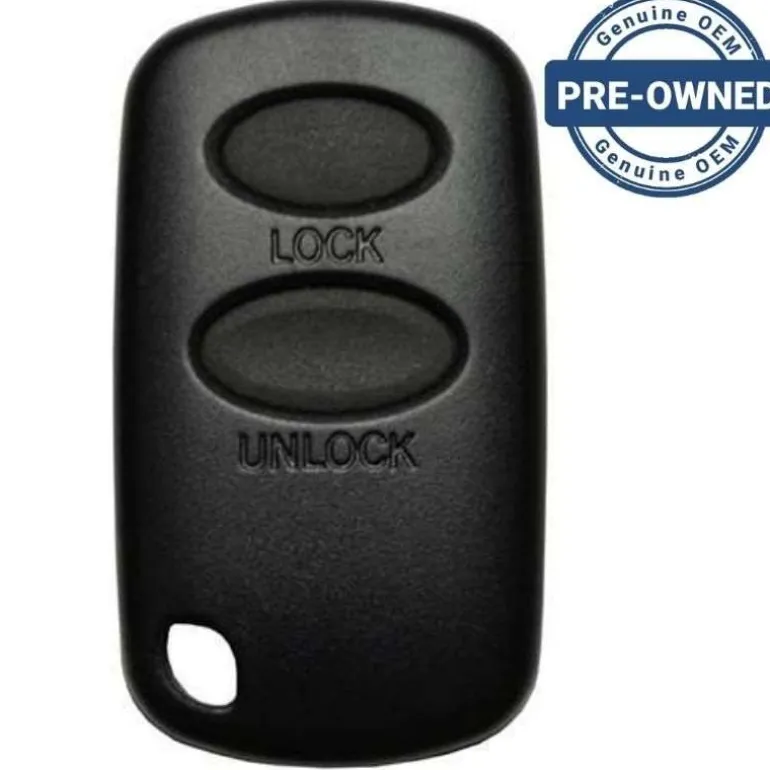
2002 Suzuki Vitara Remote PN: 37180-54G22 FCC ID: MOZD01TB with Oval Buttons
Original price was: 39,00 $.28,99 $Current price is: 28,99 $.
Before Purchasing
Important:Please make sure that your smart key fob looks identical and matches any of the part numbers or FCC IDs listed below. Contact Us with your VIN if you don’t have an existing remote for comparison.
Specifications
Part Numbers:
FCC ID:
Buttons:
Frequency:
Remote Programming:
Battery: (included)
Programming Procedure #750
- 4 remotes can be programmed into the receiver. If a 5th remote is programmed it will erase the 1st. If you want to delete a remote then program a remote 4 times. Confirm that all the doors are closed and the key is not in the ignition.
- Open the driver door.
- Perform these steps within 10 seconds. Insert the key into ignition and turn to ON position, then back to OFF and remove key.
- Within 20 seconds close and open the driver door 3 times.
- Within 10 seconds insert key into ignition and turn to ON position then back to OFF and remove key.
- Press and hold both LOCK and UNLOCK on the remote to be programmed for at least 5 seconds and then release.
- Within 5 seconds press the LOCK button on the same remote and release. All doors will automatically lock and unlock to confirm that remote has been learned.
- Test remote.
- Repeat the whole procedure for additional remotes up to four total.
Troubleshooting: If the procedure above does not work try this:
- 4 remotes can be programmed into the receiver. If a 5th remote is programmed it will erase the 1st. If you want to delete a remote then program a remote 4 times. Confirm that all the doors are closed and the key is not in the ignition.
- Open the driver door.
- Perform these steps within 10 seconds. Insert the key into ignition and turn to ON position, then back to OFF and remove key.
- Within 20 seconds close and open the driver door 3 times.
- Within 10 seconds insert key into ignition and turn to ON position then back to OFF and remove key. Locks should cycle to confirm the system has entered programming mode.
- Press UNLOCK on the remote you wish to program. The door locks should cycle to confirm.
- Repeat the whole procedure for additional remotes up to four total.
| Color | OEM Pre-owned |
|---|
Be the first to review “2002 Suzuki Vitara Remote PN: 37180-54G22 FCC ID: MOZD01TB with Oval Buttons”
Related products
Sale!

Original price was: 69,00 $.48,89 $Current price is: 48,89 $.
120,89 $
Sale!
Original price was: 169,00 $.114,89 $Current price is: 114,89 $.
70,89 $
8,99 $

0,89 $
Sale!
Buick
Original price was: 29,00 $.20,89 $Current price is: 20,89 $.
94,89 $

28,99 $
Sale!
Original price was: 79,00 $.57,99 $Current price is: 57,99 $.

41,99 $
Sale!
Original price was: 74,00 $.50,99 $Current price is: 50,99 $.

48,99 $
Sale!
Original price was: 119,00 $.78,99 $Current price is: 78,99 $.
Reviews
There are no reviews yet.